2/17/2012

Wlan driver of Jorjin SiP modules

if your use wlan modules for Jorjin, can reference my integrated of wlan driver in github.

The wlan driver will be supported WG7210, WG73x, WG75 modules,it running on the Linux 2.6.30 upon and Android GB/ICS.

So if your are interested, let us go ahead !

#################################################################
#

#   NLCP Version        : R4_12
#   Operation system    : Linux / Android
#   Date                       : Jan 2012
#   Mantainer               : Dicky Chiang
#
#################################################################

NLCP(Native Linux Communication Package) is open source with integrated for TI.

The wlan driver will to support WG72, WG73x, WG75x series of Jorjin SiP modules.

Dirver download site:

$ git clone git://github.com/dickychiang/compat-wireless-r4-12.git

========================================================================
1. How to build the driver

You can refer the script file "m.sh" for setting environment. For example:

# Export parameter
$ export ARCH=arm
$ export CROSS_COMPILE=
$ export KERNEL_PATH=
$ export KLIB=${KERNEL_PATH}
$ export KLIB_BUILD=${KERNEL_PATH}

# Compile it
$ make modules

========================================================================
2. Install .ko files

If you are compiled is completed, need to copy file ".ko" to your filesystem. Or reference the script file "cp.sh".

For example:

$ export ROOTFS=
$ cp compat/compat.ko ${ROOTFS}/lib/modules/
$ cp net/mac80211/mac80211.ko ${ROOTFS}/lib/modules
$ cp net/wireless/cfg80211.ko ${ROOTFS}/lib/modules

* WG72x
$ cp drivers/net/wireless/wl1251/*.ko ${ROOTFS}/lib/modules

* WG73x/WG75x
$ cp drivers/net/wireless/wl12xx/*.ko ${ROOTFS}/lib/modules

========================================================================
3. Firmware

Select your type of Jorjin SiP modules then to copy in filesystem.

For example:

$ cp jorjin/wg73x_fw/*.bin ${ROOTFS}/lib/firmware/ti-connectivity

========================================================================
4. Insert module

If boot in system, according to as below for insert module.

$ insmod compat.ko
$ insmod cfg80211.ko
$ insmod mac80211.ko

For your type.
$ insmod wl1251.ko
$ insmod wl1251_sdio.ko

********************************************
* Wireless Configuration (For Linux system)*
********************************************
----------------------------------------------------------------------------------------------------
IW commands are Linux based commands that are used as configuration utility for wireless devices.
IW commands also provide connection to WLAN devices however it is not supported advance security modes (supports Non secured networks and WEP only) therefore we normaly use that option for debug mode only while working without WPA supplicant.

IW commands is use 'nl80211' interface, so we need to install 'libnl' first then to support it.
----------------------------------------------------------------------------------------------------

1. Install libnl-2.0

First to download it:

$ git clone git://github.com/dickychiang/libnl-2.0.git

And export environment or can reference to script 'm.sh'

$ export ROOTFS_PATH=
$ export PATH=:$PATH
$ export CROSS_COMPILE=
$ ./configure --prefix=${ROOTFS}  CC=${CROSS_COMPILE}gcc --host=arm-linux LD=${CROSS_COMPILE}ld
$ make
$ make install
========================================================================
2. Install IW tool for wireless configuration

Download source code :

$ git clone git://github.com/dickychiang/iw-linux.git

Export environment or reference script 'm.sh' for compile.

$ export PKG_CONFIG_PATH=${ROOTFS_PATH}/lib/pkgconfig:$PKG_CONFIG_PATH
$ export PKG_CONFIG_LIBDIR=${ROOTFS_PATH}/lib/:$PKG_CONFIG_LIBDIR
$ export NFSROOT=${ROOTFS_PATH}
$ make PREFIX=${NFSROOT} CC=${CROSS_COMPILE}gcc
$ make PREFIX=${NFSROOT} CC=${CROSS_COMPILE}gcc install
========================================================================
3. How to using the iw tool

Usually, the following is commonly commands.

$ iw wlan0 scan                     // Scan for Wifi network
$ iw wlan0 connect           // Connect to specifc Access point (by its SSID)
$ iw wlan0 disconnect               // Disconnect from the Access point that the Station is connected too  
$ iw wlan0 link                     // Verify Link Status

For example as following:

$ iw wlan0 scan
BSS 00:13:46:dd:e2:e9 (on wlan0)
TSF: 362449530606 usec (4d, 04:40:49)
freq: 2452
beacon interval: 100
capability: ESS Privacy ShortPreamble (0x0031)
    signal: -50.00 dBm
    last seen: 270 ms ago
    SSID: jjap
    Supported rates: 1.0* 2.0* 5.5* 11.0* 22.0
    DS Parameter set: channel 9
    ERP:
    Extended supported rates: 6.0 9.0 12.0 18.0 24.0 36.0 48.0 54.

$ iw wlan0 connect jjap keys 0:0397430202

$ iw wlan0 link
Connected to 00:13:46:dd:e2:e9 (on wlan10)
SSID: jjap
freq: 2452
RX: 9400 bytes (96 packets)
TX: 0 bytes (0 packets)
    signal: -48 dBm
    tx bitrate: 1.0 MBit/s

    bss flags:      short-preamble
    dtim period:    3
    beacon int:     100

1/05/2012

Porting to different the MMC interface


Author : Dicky Chiang
Date : Dec 2012

Introduce:
This document describes how to porting to a different the MMC interface.
All presentation will be based on the DM37x platform with Linux kernel 2.6.37 and NLCP WLAN driver.On Dm37x WLAN SDIO is connected to MMC2 bus. For example, the following will porting to MMC3 interface.

Step 1:
In file kernel/arch/arm/mach-omap2/board-omap3evm.c
Modify Initialization and pin-muxing if using any other MMC bus.
static struct omap2_hsmmc_info mmc[] = {
{
.mmc = 1,
.caps = MMC_CAP_4_BIT_DATA | MMC_CAP_8_BIT_DATA,
.gpio_wp = 29,
},
#ifdef CONFIG_WL12XX_PLATFORM_DATA
{
.name = "wl1271",
.mmc = 3,
.caps = MMC_CAP_4_BIT_DATA | MMC_CAP_POWER_OFF_CARD,
.gpio_wp = -EINVAL,
.gpio_cd = -EINVAL,
.nonremovable = true,
},
#endif
{} /* Terminator */
};
static struct omap_board_mux board_mux[] __initdata = {
#ifdef CONFIG_WL12XX_PLATFORM_DATA
/* WLAN IRQ - GPIO 112 */
OMAP3_MUX(CSI2_DX0, OMAP_MUX_MODE4 | OMAP_PIN_INPUT),
/* WLAN POWER ENABLE - GPIO 16 */
OMAP3_MUX(ETK_D2, OMAP_MUX_MODE4 | OMAP_PIN_OUTPUT),
/* MMC3 SDIO pin muxes for WL12xx */
OMAP3_MUX(ETK_CLK, OMAP_MUX_MODE2 |
OMAP_PIN_INPUT_PULLUP),//CLK
OMAP3_MUX(ETK_CTL, OMAP_MUX_MODE2 |
OMAP_PIN_INPUT_PULLUP),//CMD
OMAP3_MUX(ETK_D3, OMAP_MUX_MODE2 |
OMAP_PIN_INPUT_PULLUP),//DATA3
OMAP3_MUX(ETK_D6, OMAP_MUX_MODE2 |
OMAP_PIN_INPUT_PULLUP),//DATA2
OMAP3_MUX(ETK_D5, OMAP_MUX_MODE2 |
OMAP_PIN_INPUT_PULLUP),//DATA1
OMAP3_MUX(ETK_D4, OMAP_MUX_MODE2 |
OMAP_PIN_INPUT_PULLUP),//DATA0
//USB gpio40
OMAP3_MUX(GPMC_A7, OMAP_MUX_MODE4 | OMAP_PIN_OUTPUT ),
#endif
{ .reg_offset = OMAP_MUX_TERMINATOR },
};

Modify regulator supply to register in kernel when the probe host MMC slot.
static struct regulator_consumer_supply panther_vmmc2_supply =
REGULATOR_SUPPLY("vmmc", "mmci-omap-hs.2")


Step 2.
In file kernel/arch/arm/mach-omap2/devices.c
Add to supported MMC3 host controller at omap2_mmc_mux func.
/* For MMC3 the pins need to be muxed in the board-*.c files */
if (controller_nr == 2) {
/* MMC3 */
omap_mux_init_signal("sdmmc3_clk",
OMAP_PIN_INPUT_PULLUP);
omap_mux_init_signal("sdmmc3_cmd",
OMAP_PIN_INPUT_PULLUP);
omap_mux_init_signal("sdmmc3_dat0",
OMAP_PIN_INPUT_PULLUP);
/*
* For 8 wire configurations, Lines DAT4, 5, 6 and 7 need to be muxed
* in the board-*.c files
*/
if (mmc_controller->slots[0].caps &
(MMC_CAP_4_BIT_DATA | MMC_CAP_8_BIT_DATA)) {
omap_mux_init_signal("sdmmc3_dat1",
OMAP_PIN_INPUT_PULLUP);
omap_mux_init_signal("sdmmc3_dat2",
OMAP_PIN_INPUT_PULLUP);
omap_mux_init_signal("sdmmc3_dat3",
OMAP_PIN_INPUT_PULLUP);
}
if (mmc_controller->slots[0].caps &
MMC_CAP_8_BIT_DATA) {
omap_mux_init_signal("sdmmc3_dat4.sdmmc3_dat4",
OMAP_PIN_INPUT_PULLUP);
omap_mux_init_signal("sdmmc3_dat5.sdmmc3_dat5",
OMAP_PIN_INPUT_PULLUP);
omap_mux_init_signal("sdmmc3_dat6.sdmmc3_dat6",
OMAP_PIN_INPUT_PULLUP);
omap_mux_init_signal("sdmmc3_dat7.sdmmc3_dat7",
OMAP_PIN_INPUT_PULLUP);
}
}


Step 3.
In file kernla/arch/arm/mach-omap2/mux34xx.c
Add the pin mux for support MMC3 interface. ( According the schematics and TRM)
static struct omap_mux __initdata omap3_muxmodes[] = {
……..
//MMC3_CLK
_OMAP3_MUXENTRY(ETK_CLK, 12,
"etk_clk", "mcbsp5_clkx", "sdmmc3_clk", "hsusb1_stp",
"gpio_12", "mm1_rxdp", "hsusb1_tll_stp", "hw_dbg0"),
//MMC3_CMD
_OMAP3_MUXENTRY(ETK_CTL, 13,
"etk_ctl", NULL, "sdmmc3_cmd", "hsusb1_clk",
"gpio_13", NULL, "hsusb1_tll_clk", "hw_dbg1"),
//MMC3_DATA0
_OMAP3_MUXENTRY(ETK_D4, 18,
"etk_d4", "mcbsp5_dr", "sdmmc3_data0", "hsusb1_data4",
"gpio_18", NULL, "hsusb1_tll_data4", "hw_dbg6"),
//MMC3_DATA1
_OMAP3_MUXENTRY(ETK_D5, 19,
"etk_d5", "mcbsp5_fsx", "sdmmc3_data1", "hsusb1_data5",
"gpio_19", NULL, "hsusb1_tll_data5", "hw_dbg7"),
//MMC3_DATA2
_OMAP3_MUXENTRY(ETK_D6, 20,
"etk_d6", "mcbsp5_dx", "sdmmc3_data2", "hsusb1_data6",
"gpio_20", NULL, "hsusb1_tll_data6", "hw_dbg8"),
//MMC3_DATA3
_OMAP3_MUXENTRY(ETK_D6, 17,
"etk_d3", "mcbspi3_clk", "sdmmc3_data3", "hsusb1_data7",
"gpio_17", NULL, "hsusb1_tll_data7", "hw_dbg5")
………..
}

Step 4.
In file u-boot/ti/evm/evm.h
Add the mux configuration for that pin at u-boot.
#define MUX_EVM() \
………
/* SDIO Interface to WIFI Module */ \
MUX_VAL(CP(ETK_CLK_ES2), (IEN | PTU | EN | M4)) /*MMC3_CLK*/\
MUX_VAL(CP(ETK_CTL_ES2), (IEN | PTU | EN | M4)) /*MMC3_CMD*/\
MUX_VAL(CP(ETK_D4_ES2), (IEN | PTU | EN | M4))/*MMC3_DATA0*/\
MUX_VAL(CP(ETK_D5_ES2), (IEN | PTU | EN | M4))/*MMC3_DATA1*/\
MUX_VAL(CP(ETK_D6_ES2), (IEN | PTU | EN | M4))/*MMC3_DATA2*/\
MUX_VAL(CP(ETK_D3_ES2), (IEN | PTU | EN | M4))/*MMC3_DATA3*/\
……..
#endif

Porting wg7210(WL1251) with Linux 2.6.37 on AM18


Below is port of wg7210 info for kernel 2.6.37 with Linux on the AM18 platform.

First, your can get patches and nlcp driver ( modifies to wg7210 ) with firmware 4.0.4.32 from my git.

kernel patches ( include firmware for wg7210 ):

$ git clone git://github.com/dickychiang/am18-wg7210-patch.git

compat-wireless-r4-11-wg7210 :

$ git clone git://github.com/dickychiang/compat-wireless-r4-11.git

The driver will support iw tool to configure wireless.

Also the porting of wg7210 need to take care to important the following :

a) wg7210 has inside the eeprom. To fill structure in wl12xx_platform_data of "use_eeprom".

In board-*.c file :


static struct wl12xx_platform_data da850_wl12xx_wlan_data __initdata = {                                                              

    .irq = -1,
    .board_ref_clock = CONFIG_DA850_MISTRAL_WL12XX_REFCLOCK,
    .platform_quirks = WL12XX_PLATFORM_QUIRK_EDGE_IRQ,
    .use_eeprom = 1,
};

If already, in insert wl1251.ko module will be R/W to eeprom and create a network interface. ( Note, check the irq is work well and connected to EVB.)

And then insert wl1251_sdio.ko will be download firmware into chip.

wl1251: chip id 0x7020101 (1251 PG11)
wl1251: firmware booted (Rev 4.0.4.3.5)

b)  Since it the SDIO of CCCR,CIS,FBR is in not corrent. so kernel can not to get right information to match for wg7210. My ideas is give the card information to kernel such as vendor and device id which let kernel to know the sdio device is match to my sdio driver for wg7210.

In drivers/mmc/core/sdio.c :

b-1) Mark the read cccr,cis at mmc_sdio_init_card func.
                                                  
#ifndef CONFIG_WG7210                                                                                  
    err = sdio_read_cccr(card);                                                                        
    if (err)                                                                                                                          
        goto remove;                                                                                   
#endif                                                                                                 
                                                                                
#ifndef CONFIG_WG7210                                                                                  
    err = sdio_read_common_cis(card);                                                                  
    if (err)                                                                                           
        goto remove;                                                                                   
#endif

To fill the card''s maximum speed with clock. ( Default the value is get from cccr register )

#ifdef CONFIG_WG7210
    card->cis.max_dtr = 25000000;
#endif
    mmc_set_clock(host, mmc_sdio_get_max_clock(card));
b-2) Mark the read fbr and set the id's info to structure sdio_func at sdio_init_func.

#ifndef CONFIG_WG7210                                                                                  
    if (!(card->quirks & MMC_QUIRK_NONSTD_SDIO)) {                                                     
        ret = sdio_read_fbr(func);                                                                     
        if (ret)                                                                                       
            goto fail;                                                                                 
                                                                                                       
        ret = sdio_read_func_cis(func);                                                                
        if (ret)
            goto fail;                                                                                 
    } else {                                                                                           
        func->vendor = func->card->cis.vendor;                                                         
        func->device = func->card->cis.device;                                                         
        func->max_blksize = func->card->cis.blksize;                                                   
    }                                                                                                  
#else                                                                                                  
    func->vendor = 0x104c;                                                                             
    func->device = 0x9066;                                                                             
    func->max_blksize = 4096;                                                                          
#endif  

Note, the max block size value is depend on mmc host controller, if not to match wii be failed in send CMD52.


c) Modify the download firmware path in nlcp driver :

In compat-wireless/drivers/net/wireless/wl1251/wl1251.h

#define WL1251_FW_NAME "ti-connectivity/wl1251-fw.bin"
#define WL1251_NVS_NAME "ti-connectivity/wl1251-nvs.bin"


d) If want to debug NLCP driver,do it to following. ( The method can used to wl12xx )

    look at compat-wireless/driver/net/wireless/wl1251/wl1251.h, you can find its.

enum {
    DEBUG_NONE  = 0,
    DEBUG_IRQ   = BIT(0),
    DEBUG_SPI   = BIT(1),
    DEBUG_BOOT  = BIT(2),
    DEBUG_MAILBOX   = BIT(3),
    DEBUG_NETLINK   = BIT(4),
    DEBUG_EVENT = BIT(5),
    DEBUG_TX    = BIT(6),
    DEBUG_RX    = BIT(7),
    DEBUG_SCAN  = BIT(8),
    DEBUG_CRYPT = BIT(9),
    DEBUG_PSM   = BIT(10),
    DEBUG_MAC80211  = BIT(11),
    DEBUG_CMD   = BIT(12),
    DEBUG_ACX   = BIT(13),
    DEBUG_ALL   = ~0,
};

#define DEBUG_LEVEL (DEBUG_NONE)

To modifies the DEBUG_LEVEL for you want to check the driver info. Suppose I wonder to see the BOOT and MAC80211 information :
 DEBUG_BOOT  = BIT(2)             =>    (1 << 2)  =  0x4
 DEBUG_MAC80211  = BIT(11)     =>   (1 << 11) =  0x800

so the answer :

#deinfe DEBUG_LEVEL   0x804

Re-build it now.   And then to entry the file system ( For example with Linux based ) and enable all kernel prints level.
echo 8 > /proc/sys/kernel/printk

Running daemon for print the kernel logs :

cat /proc/kmsg &

Your can see the debug message when insert wl1251.ko ( or wl12xx.ko ) and wl1251_sdio.ko ( or wl12xx_sdio.ko ).

11/12/2011

在rowboat的Android 2.3.4 (based on DM37),點擊webkit的browser常常都會crash...


I/ActivityManager(  863): Starting activity: Intent { act=android.intent.action.MAIN flg=0x10000000 cmp=com.android.browser/.BrowserActivity }
I/ActivityManager(  863): Start proc com.android.browser for activity com.android.browser/.BrowserActivity: pid=1341 uid=10014 gids={3003, 1015}
I/ActivityThread( 1341): Publishing provider browser: com.android.browser.BrowserProvider
I/ActivityManager(  863): Displayed activity com.android.browser/.BrowserActivity: 1525 ms (total 1525 ms)
D/dalvikvm( 1341): GC_FOR_MALLOC freed 3858 objects / 224504 bytes in 122ms
W/dalvikvm( 1341): JNI WARNING: JNI method called with exception raised
W/dalvikvm( 1341):              in Landroid/webkit/JWebCoreJavaBridge;.sharedTimerFired ()V (NewLocalRef)
W/dalvikvm( 1341): Pending exception is:
I/dalvikvm( 1341): Ljava/lang/IllegalArgumentException;: provider=gps
I/dalvikvm( 1341):  at android.os.Parcel.readException(Parcel.java:1251)
I/dalvikvm( 1341):  at android.os.Parcel.readException(Parcel.java:1235)
I/dalvikvm( 1341):  at android.location.ILocationManager$Stub$Proxy.requestLocationUpdates(ILocationManager.java:516)
I/dalvikvm( 1341):  at android.location.LocationManager._requestLocationUpdates(LocationManager.java:711)
I/dalvikvm( 1341):  at android.location.LocationManager.requestLocationUpdates(LocationManager.java:630)
I/dalvikvm( 1341):  at android.webkit.GeolocationService.registerForLocationUpdates(GeolocationService.java:162)
I/dalvikvm( 1341):  at android.webkit.GeolocationService.start(GeolocationService.java:66)
I/dalvikvm( 1341):  at android.webkit.JWebCoreJavaBridge.sharedTimerFired(Native Method)
I/dalvikvm( 1341):  at android.webkit.JWebCoreJavaBridge.fireSharedTimer(JWebCoreJavaBridge.java:88)
I/dalvikvm( 1341):  at android.webkit.JWebCoreJavaBridge.handleMessage(JWebCoreJavaBridge.java:105)
I/dalvikvm( 1341):  at android.os.Handler.dispatchMessage(Handler.java:99)
I/dalvikvm( 1341):  at android.os.Looper.loop(Looper.java:123)
I/dalvikvm( 1341):  at android.webkit.WebViewCore$WebCoreThread.run(WebViewCore.java:621)
I/dalvikvm( 1341):  at java.lang.Thread.run(Thread.java:1096)
I/dalvikvm( 1341): "WebViewCoreThread" prio=5 tid=11 NATIVE
I/dalvikvm( 1341):   | group="main" sCount=0 dsCount=0 s=N obj=0x4402d3e8 self=0x254b78
I/dalvikvm( 1341):   | sysTid=1354 nice=0 sched=0/0 cgrp=unknown handle=2444472
I/dalvikvm( 1341):   at android.webkit.JWebCoreJavaBridge.sharedTimerFired(Native Method)
I/dalvikvm( 1341):   at android.webkit.JWebCoreJavaBridge.fireSharedTimer(JWebCoreJavaBridge.java:88)
I/dalvikvm( 1341):   at android.webkit.JWebCoreJavaBridge.handleMessage(JWebCoreJavaBridge.java:105)
I/dalvikvm( 1341):   at android.os.Handler.dispatchMessage(Handler.java:99)
I/dalvikvm( 1341):   at android.os.Looper.loop(Looper.java:123)
I/dalvikvm( 1341):   at android.webkit.WebViewCore$WebCoreThread.run(WebViewCore.java:621)
I/dalvikvm( 1341):   at java.lang.Thread.run(Thread.java:1096)
I/dalvikvm( 1341): 

這現象非常奇怪,一直以為是我porting wifi 出了問題...

一路trace過去,終於發現原來是因為Google的webkit在開啟預設頁面時,都會去啟動GPS來尋找location相關資料,而且還沒有error handle的處理方式...

而啟動的service叫做Geolocationservice,一開始在external/webkit/Webcore把ENABLE_GEOLOCATION的定義拿掉,但還是一樣不行....

在想不到更好的解決方式之下...只好直接從Java裡把gps register拿掉,可以暫時避掉這問題。

From 30fe105d47ec283b46865d4c94c17c065048bd3e Mon Sep 17 00:00:00 2001 
From: Dicky Chiang
Date: Fri, 11 Nov 2011 04:17:12 +0800
Subject: [PATCH 20/20] fix browser crashes out of the webkit
---
 .../java/android/webkit/GeolocationService.java    |    4 ++++
 1 files changed, 4 insertions(+), 0 deletions(-)


diff --git a/frameworks/base/core/java/android/webkit/GeolocationService.java b/frameworks/base/core/java/android/webkit/    GeolocationService.java
index 24306f4..348715f 100755
--- a/frameworks/base/core/java/android/webkit/GeolocationService.java
+++ b/frameworks/base/core/java/android/webkit/GeolocationService.java
@@ -158,10 +158,14 @@ final class GeolocationService implements LocationListener {
         try {
             mLocationManager.requestLocationUpdates(LocationManager.NETWORK_PROVIDER, 0, 0, this);
             mIsNetworkProviderAvailable = true;
+
+            // Can be register it if gps device on platform, otherwise to disable it.
+            /*
             if (mIsGpsEnabled) {
                 mLocationManager.requestLocationUpdates(LocationManager.GPS_PROVIDER, 0, 0, this);
                 mIsGpsProviderAvailable = true;
             }
+            */
         } catch(SecurityException e) {
             Log.e(TAG, "Caught security exception registering for location updates from system. " +
                 "This should only happen in DumpRenderTree.");
-- 
1.7.4.1 


10/30/2011

GIT協同開發


自己學git的時間,斷斷續續加起來也不過2個多月的時間,認識週遭的同事大多也都使用SVN,鮮少接觸到git。

正如之前說的,用git的時機大多只管理我自己的job...很少用git跟人一起協同開發..

而自己對git的原理也矇矇矓矓的,只知道git對我來說,是個非常棒的軟體管理和提高效率的好工具!

奈何它也確實學習曲線頗高,剛接觸的人如果不是抱有很大的興趣的話,很容易讓人打退堂鼓。

前陣子公司正好要開始開發系統的東西,意識到沒有版本控制的工具,真的會一團亂...所以開會提出要架設server來管理版本。

這對我來說實在是大好機會 ! 立刻毫不猶豫把Git提出來,並分析Git的好處和它的優秀又快速的branch...

很可惜的,最終還是敗給SVN,因為SVN相對而言較簡單,我也承認SVN的確入門....但我對它的歷史查找和開設branch實在是無法認同。

SVN架了一陣子,因為種種因素而失敗,所以最後主管同意讓我去架設git server,這讓我高興了好一陣子呀 XD

雖然server我不會架...但弄一個簡單的repository讓同事clone這點我還是會的qq

因為公司有同事並不熟悉git,所以就寫了這些東西,順便拷貝上來作筆記 :)

============

整個source branch model我都是參考這篇,這對個人或小型團隊真的是滿漂亮的模型,我自己的job也都是這樣去分的 :)

一般而言,我都會在遠端開設develop分支,所以clone下來之後可以看到兩個遠端分支 :


預設都會指向遠端master分支,因為master屬於穩定發佈的分支,是不能隨便去merge或是commit,所以應該在自己的本地去新建一個分支,這個分支的名字最好對應遠端develop,讓自己知道該向哪一個遠端分支進行提交 :


"git co -b develop" 這意思就是在當前的分支(master)checkout出來一份並切換到你建立的分支底下,所以這時master和develop就屬於同一平行線上,不管你對develop做多少修改,都不會影響到master分支,所以從develop分支底下就可以安心進行工作了.

但依我自己的習慣,我建議在develop底下再建立一個分支來開發,等最後開發好了再merge到develop。這樣做的原因是一來不用擔心自己把develop這分支弄壞,造成其它人的不便。二來隨時可以很方便的對develop分支進行diff,來觀察自己改了什麼導致系統不正常或其它原因。三來是怕有時腦神經大條,commit到錯的檔案或是忘了add ( 這點我常犯的XD),最後還要用reset回去...

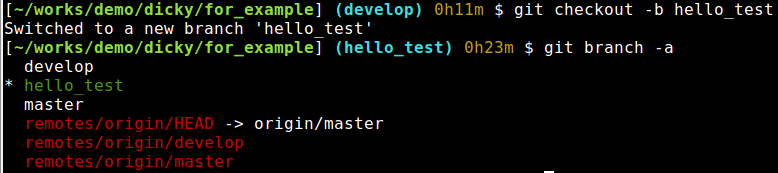
所以在develop分支底下再checkout出來一分 :


現在可以安心進行開發了,先在a.c裡面加了一個printf :


可以看到多了一個"Hello test",還有status,以及最後再把它commit上去,現在回到develop底下,再merge hello_test,讓develop有了hello_test功能 :


加"--no-ff"是為了讓merge之後的訊息不要遺失,清楚呈現整個分支merge狀況,像這樣 :


現在dicky的工作結束了,所以可以對遠端develop提交成果,讓大家可以使用你的功能 :


註 : 如果發現自己merge的分支裡面有存在很嚴重的bug,但都己經commit和push到遠端分支了....該怎麼還原遠端分支 ? 用reset只對自己的本地有用而己...
我不清楚是否還有更好的辦法,我自己是先創個分支把develop備份起來,再回到develop使用reset --hard還原,然後把遠端develop砍了....再重新把reset過的develop push上去 :

$ git checkout -b develop_bak develop                                            // 先備份develop
$ git checout develop                                                                    // 切回develop
$ git reset --hard 2941b2d2e89adc311354bffea4fb521941976790     // 還原
$ git push origin :develop                                                             //  把遠端分支砍了
$ git push origin develop                                                              //  再重新push develop到遠端


假設Jimmy也clone一份,但他需要知道先前有沒有人更新過,所以在工作前要把server上資料pull下來:


從git回應的訊息來看,Jimmy知道有人創建develop並在更新遠端develop,這時Jimmy想要跟蹤這個遠端分支develop,並且以後也想在develop做開發 ,可以運行"git checkout --track origin/develop" :


這樣一來,Jimmy以後可以在自己的develop分支來進行開發和提交了。

假設另一個人Jack在develop更新了功能並己經更新,但Dicky並不知道,也更新了develop,commit之後在push時會出現git需要先pull :


Dicky也對遠端develop進行pull,但卻發現在Auto merge a.c 時發生錯誤 :


這時就需要自己手動把錯誤修改回來再commit回去,先來看看錯誤是長什麼樣子 :


所謂的"HEAD"就是自己所增加的程式,而另外一個用"="分開並用哈希做為結尾就是Jack所增加的程式,通常這種錯誤都是發生在兩方修改同一行,Git是沒辦法解決這種衝突,需要自行修改,修改完之後長這樣 :


這時Dicky就可以再重新commit和push上去了 :